 Be Your Own Algorithm!
What is RSS?
Did you know that you can curate your own feed by subscribing to RSS and Atom links? You don’t need to rely on Big Tech companies to decide what website updates you see! RSS (which you can usually identify by the little  icon), is an old technology that still works. Back in the day, the way you’d keep up with blogs is by subscribing to their RSS feed. Whenever a site is updated, your feed reader gives you a little notification. I’ve recently rediscovered this tech and realized it is used for so much more than blogs. Any website can have a feed, and tons do! By curating your own feed, you can doomscroll less on social media and not worry about “missing” important updates from your favorite creators, writers, and artists.
Setting up a Feed Reader
There are tons of different feed readers available, all with different features, quirks, and UIs. Right now, I’m using Feedbro, a browser extension. It’s free and has a built-in “Find feeds in current tab” function which helps find non-obvious RSS feeds (useful for recipe sites—more on that later!)
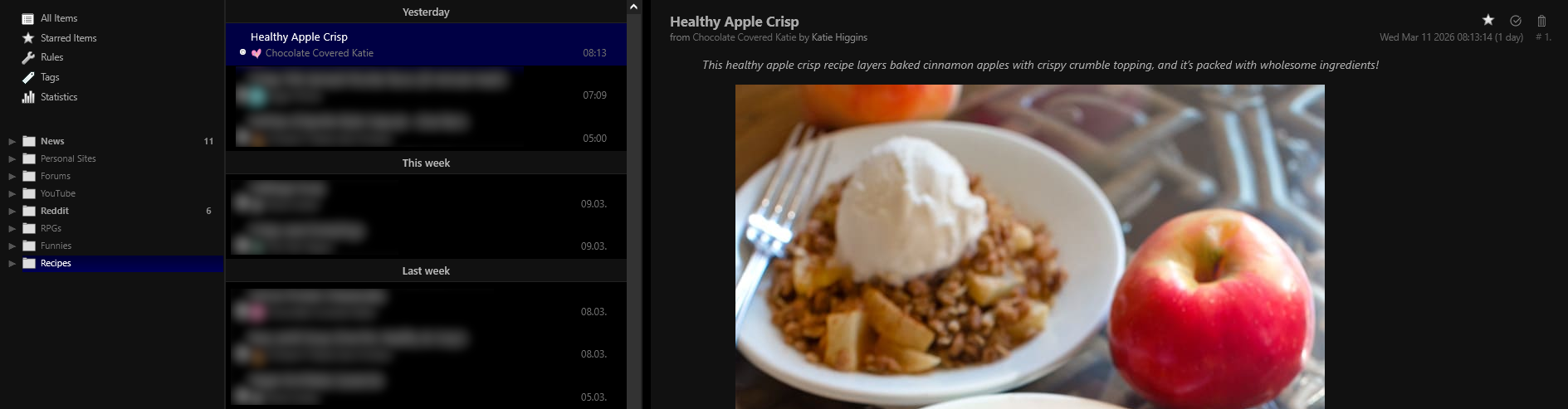
I have all my feeds organized into different folders for easy viewing. This also means I can "scroll" feeds for my various interests! If you use Feedbro, I recommend using View Mode 3 (Press the 3 key on your keyboard). To subscribe to a new feed on Feedbro, just click the  at the top of the screen and paste in the RSS feed URL. This is how my setup looks when viewing my "Recipes" folder feed (blurred for privacy):
Subscribe to some feeds!
Okay, your feed reader is set up, but what sites should you subscribe to? This is a very personal process. I don't know what you like, but here are some ideas:
Indie/Small Web Feeds
Since you’re reading this, chances are you’re into the “independent web,” so check out the BIG List of Neocities RSS Feeds. You might see some familiar names.
If you’re part of any forums, you can subscribe to updates from those as well! Your feed reader should be able to automatically detect feeds within these forums, so you can, for example, subscribe to certain specific sub-forums.
You can also keep up with status.cafe updates by subscribing to user’s Atom feeds (Atom is like RSS and will work with your feed reader). You can do this with the following URL, just replace USERNAME:
https://status.cafe/users/USERNAME.atom
Recipe Sites
Do you have any favorite recipe writers or food bloggers? I’ve found that most of the time recipe websites don’t advertise their RSS feed anywhere (I’m sure RSS is just a standard feature of recipe website templates they don't think about), but they pretty much all have one! If you don't see the feed icon, you’ll need to poke around with your feed reader’s auto-detection or by manually typing /feed or /rss (for example, "https://rainbowplantlife.com/feed")
Webcomics
Webcomics usually have a feed! Comics are typically more transparent about their feeds than recipe sites. For example, XKCD’s feed can be found just below the comic.

YouTube
You can subscribe to YouTube channels via RSS! They don't make it obvious how to do it, but here's how:
- Navigate to the YouTube Channel
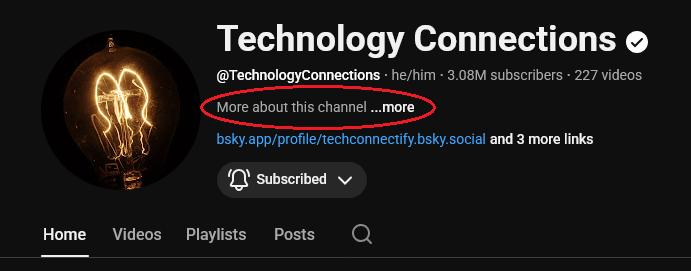
- Click "More about this channel"
- Under "Share Channel," click "Copy Channel ID"
- The channel's feed will be at https://www.youtube.com/feeds/videos.xml?channel_id=CHANNEL ID
If you'd like to exclude Shorts from the feed, replace the initial UC with UULF in the channel ID, like this:
https://www.youtube.com/feeds/videos.xml?playlist_id=UULF Channel ID
You can read more about creating YouTube RSS feeds and see some examples on this blog.
You can subscribe to specific subreddits via RSS as well! Note you'd probably only want to do this with niche/small reddits, because seeing every new post is kind of a firehose.
It seems there are two ways to get subreddit RSS feeds-- certain readers may prefer one over the other. This is what r/neocities' feed looks like:
https://old.reddit.com/r/neocities/.rss
or
http://old.reddit.com/r/neocities.rss
News sites
You can subscribe to your favorite news sources using RSS! Personally, I am subscribed to some local public media affiliates to keep up to date with local happenings. For a bit of fun, you can also subscribe to The Onion!

Syndicate yourself!
If you create things online, you can add to this ecosystem by syndicating your own material! There are lots of resources on how to create your own feed, I recommend this template made by Yogo Magpie.